

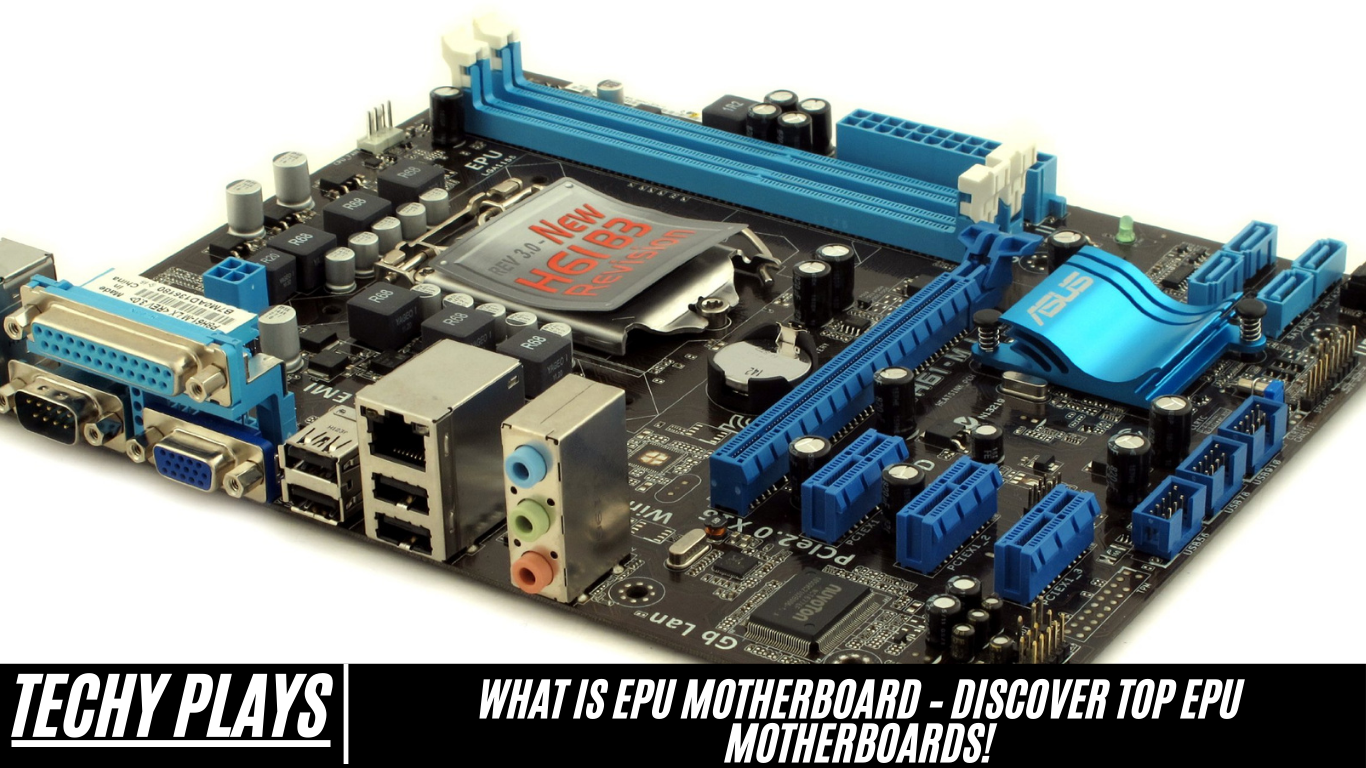
Understanding EPU Technology
1. How EPU Works
EPU technology, also known as the Energy Processing Unit, acts as an intelligent power-management controller built directly into the motherboard. It constantly analyzes your computer’s workload—such as gaming, browsing, or running heavy applications—and adjusts power delivery in real time.
When your system requires high performance, the EPU automatically supplies additional power to ensure smooth operation. On the other hand, when the workload is light or the computer is idle, it reduces power consumption to avoid unnecessary energy usage. This dynamic power adjustment not only improves overall efficiency but also promotes longer hardware lifespan by preventing excessive heat and strain on components.
2. Importance of EPU in Motherboards
EPU plays a crucial role in modern motherboards because it significantly contributes to power optimization and energy efficiency. By intelligently managing voltage levels and distributing power according to system demands, EPU technology helps reduce electricity waste and ensures that no component uses more energy than required.
Advantages of EPUs
1. Standards-Based
EPUs are developed following well-established industry standards, which ensures seamless compatibility with a wide range of hardware and software platforms. Because they adhere to these universal guidelines, EPUs integrate smoothly into different system architectures without requiring complex adjustments. This standards-based design offers manufacturers and users a highly reliable and predictable solution for various applications, from consumer electronics to industrial systems.
2. Faster time to market and money
One of the major advantages of EPUs is their ability to accelerate product development. Since EPUs are designed for quick integration and efficient performance, companies can build and launch new devices much faster. This reduces engineering complexity, cuts development costs, and shortens the time it takes to bring a product to market. Ultimately, businesses benefit from both time savings and financial efficiency, making EPUs a smart choice for cost-effective innovation.
3. Extremely compact
EPUs are engineered to be exceptionally small in size, making them ideal for modern devices that prioritize sleek and minimalistic designs. Their compact footprint helps manufacturers save valuable internal space, allowing more room for additional components or enabling slimmer and more lightweight products. This makes EPUs especially useful in portable gadgets, smart devices, and equipment where space is limited.
4. Flexible
Flexibility is one of the standout features of EPUs. They can be tailored to meet different performance requirements and are suitable for a wide variety of applications. Whether used in everyday consumer electronics, automotive systems, or industrial machinery, EPUs can be adjusted and optimized to match specific operational needs. This adaptability makes them highly valuable for diverse and evolving technological environments.
5. Expandable
EPUs are designed with expandability in mind, allowing them to support additional features or upgrades as technology progresses. This expandable architecture ensures that systems using EPUs can evolve over time without requiring complete hardware replacements. As new capabilities become available, EPUs can be enhanced to maintain high performance and stay aligned with modern standards, extending the overall lifespan of the device.
6. Future Proof
Future-proofing is a key benefit of EPUs. They are built to remain compatible with upcoming technologies and new industry trends. This forward-thinking approach means users and manufacturers can rely on EPUs for long-term relevance, even as technological landscapes change. By supporting newer innovations without major redesigns, EPUs provide stability and long-term value.
7. Rugged
EPUs are engineered to operate reliably even in tough or extreme conditions. Their rugged construction allows them to withstand physical stress, temperature fluctuations, vibrations, and other environmental challenges. Because of this durability, EPUs are well-suited for industrial applications, outdoor equipment, and environments where performance must remain consistent under pressure.
8. Reliable
Reliability is one of the most important strengths of EPUs. They deliver stable, consistent performance, making them a trusted component in mission-critical systems. Whether in medical devices, transportation systems, or high-precision machinery, EPUs help ensure that operations run smoothly without unexpected failures. Their dependable nature reinforces their role as a preferred choice in applications where stability and accuracy are essential.
Read more: Are Msi Motherboards Good – Complete Details In 2025!
Popular EPU Motherboard Brands
1. ASUS
ASUS is widely recognized for its innovative engineering and commitment to high-performance computing. Their EPU-enabled motherboards are designed with advanced power-saving features that intelligently optimize energy usage without compromising speed or stability. ASUS also offers a broad lineup—from entry-level boards to premium gaming and workstation motherboards—ensuring that users of all skill levels can benefit from efficient and reliable EPU technology. With exceptional build quality, long-term durability, and a strong reputation in the tech industry, ASUS remains one of the most trusted brands for EPU motherboards.
2. Gigabyte
Gigabyte is another top-tier manufacturer known for producing dependable and performance-oriented EPU motherboards. Their products are crafted to deliver stable power management, making them suitable for everyday computing, gaming, and professional workloads. Gigabyte offers a wide variety of motherboards tailored to different budgets, allowing users to choose the right balance between cost, features, and efficiency.
Gigabyte
Source: Gigabyte
Whether you’re building a budget-friendly PC or a high-end system, Gigabyte’s EPU-supported motherboards ensure energy-efficient performance and long-term reliability, making them a popular choice among both beginners and advanced PC builders.
3. MSI
MSI stands out in the motherboard market for its robust architecture, premium components, and feature-rich designs. Their EPU motherboards are engineered to enhance power efficiency while maintaining superior system performance.
MSI EPU motherboards excel in performance and efficiency, offering optimized power management that appeals to gamers, content creators, and professionals who require stable and consistent output. Known for excellent thermal design, strong durability, and user-friendly BIOS interfaces, MSI continues to be a preferred brand for users seeking a blend of efficiency, power, and advanced functionality.
Choosing the Right EPU Motherboard
Several factors must be evaluated when selecting an EPU motherboard to ensure that the system performs smoothly, remains compatible with your hardware, and offers good value for your investment. Making the right choice helps maximize the efficiency of EPU technology and ensures a stable, power-optimized computing experience.
1. Compatibility
Compatibility is one of the most important considerations when choosing an EPU motherboard. It refers to how well the motherboard works with essential components such as the CPU, graphics card, RAM modules, power supply, and storage devices. Ensuring compatibility prevents hardware conflicts, improves system performance, and helps users avoid unnecessary troubleshooting. Before making a purchase, it’s important to check the motherboard’s chipset, socket type, supported memory speeds, and expansion options so the system can operate efficiently with EPU features enabled.
2. Budget Considerations
Budget considerations play a significant role in selecting the right EPU motherboard. Prices vary based on brand reputation, build quality, supported features, and performance capabilities. Users should compare the available options, weighing benefits such as energy-saving features, connectivity, and upgrade potential against their spending limits. The goal is to choose a motherboard that offers strong value for money—meeting performance needs without exceeding the intended budget.
3. Desired Features
Desired features refer to the specific functionalities users look for when selecting an EPU motherboard. These features depend on individual requirements such as gaming performance, overclocking abilities, advanced cooling solutions, multiple connectivity ports, or support for high-speed storage. Whether the priority is energy efficiency, multitasking performance, or future-proofing, understanding these preferences helps users select a motherboard that aligns with their needs while making the most of EPU technology.
Installation and Setup
1. Installing an EPU Motherboard
Installing an EPU motherboard involves several steps that ensure proper placement and secure mounting inside the computer case. The process includes carefully positioning the motherboard on the mounting standoffs, aligning it with the I/O shield, and fastening it using screws to keep it stable. After mounting, the user must connect essential components such as the CPU, RAM, power connectors, storage drives, and peripheral cables. Proper installation ensures stable performance and allows the motherboard’s EPU system to function efficiently.
2. Configuring EPU Settings
Configuring EPU settings requires accessing the motherboard’s BIOS or UEFI interface. Within this menu, users can enable, disable, or fine-tune EPU-related power management options. Adjusting these settings allows users to tailor the system’s energy-saving features according to their preferences—whether they prioritize maximum performance, balanced operation, or optimal power efficiency. Proper configuration helps the EPU operate effectively, ensuring smart power distribution and consistent energy savings across the system.
Troubleshooting EPU Issues
Diagnosing issues related to an EPU motherboard requires a systematic approach to identify compatibility conflicts, firmware problems, hardware faults, or incorrect configurations. Addressing these areas ensures the EPU performs efficiently and continues to manage system power effectively.
Compatibility Problems:
To prevent compatibility-related malfunctions, always ensure that every hardware component—from the CPU and RAM to storage and power supply—matches the specifications supported by your EPU motherboard. Reviewing manufacturer compatibility lists and system requirements helps avoid instability and ensures smooth EPU operation.
Firmware Glitches:
Firmware issues can interrupt EPU functionality and lead to unpredictable system behavior. Updating the motherboard’s BIOS or firmware to the latest version often resolves software-related bugs. Manufacturers regularly release updates to improve power efficiency, stability, and EPU responsiveness.
Hardware Malfunctions:
Physical issues such as loose cables, damaged components, or faulty slots can interfere with EPU communication. Inspect all hardware connections thoroughly, check for visible signs of damage, and replace malfunctioning components as needed. Ensuring stable power delivery and reliable hardware connections helps maintain optimal EPU performance.
BIOS Settings:
Incorrect BIOS settings can disable or limit EPU functionality. Access the BIOS menu and verify that EPU-related power management features are enabled. Fine-tuning voltage control, frequency adjustment, and energy-saving profiles can help optimize your system’s efficiency.
Temperature Monitoring:
Excessive heat can negatively affect EPU performance and overall system stability. Regularly monitor CPU and system temperatures using monitoring tools to ensure the hardware stays within safe operating ranges. Proper cooling, clean airflow pathways, and adequate case ventilation help maintain a stable environment for EPU regulation.
ASUS TPU and EPU? What exactly is this?
Many ASUS motherboards feature both TPU (TurboV Processing Unit) and EPU (Energy Processing Unit) technologies. TPU is designed to enhance CPU performance, especially during overclocking, by automatically adjusting system parameters for higher speed and responsiveness. In contrast, EPU focuses on power efficiency, managing voltage and frequency settings to reduce unnecessary energy consumption without compromising system reliability.
EPU and TPU on Motherboard?
EPU and TPU are advanced hardware-based technologies commonly integrated into ASUS motherboards to create a balanced performance environment.
The EPU (Energy Processing Unit) prioritizes efficient power usage by dynamically adapting voltage and frequency based on system workload, helping reduce energy waste and extend component lifespan.
The TPU (TurboV Processing Unit), on the other hand, is tailored for users who need superior performance, particularly during CPU overclocking. It optimizes processor behavior, allowing smoother multitasking and improved computing power.
EPU – Unplugging The Cable
Unplugging the cable from the EPU refers to disconnecting the power cable or any associated connector linked to the motherboard’s Energy Processing Unit. This step may be necessary during system maintenance, motherboard replacement, component upgrades, or troubleshooting electrical issues. Ensuring the system is powered off before unplugging any cables is important for safety and preventing hardware damage.
Help with EPU Error Message
If an EPU error message appears, consult the motherboard manual or the manufacturer’s online documentation for specific troubleshooting instructions. Start by checking cable connections, verifying BIOS configurations, and updating firmware. If the error persists, contact technical support for specialized guidance, as the issue may involve deeper hardware or firmware concerns.
Asus EPU Power Saving Mode: Should I enable it?
Enabling the ASUS EPU Power Saving Mode can be highly beneficial for users who want to reduce energy usage without sacrificing everyday performance. This feature intelligently adjusts voltage and frequency levels based on current system demands, helping lower power consumption and minimize environmental impact. For most users, enabling EPU Power Saving Mode provides a balanced combination of efficiency, stability, and cost-saving benefits.
ASUS P5KPL-AM EPU Motherboard
The ASUS P5KPL-AM EPU motherboard is equipped with advanced Energy Processing Unit (EPU) technology designed to enhance overall system efficiency. This technology automatically analyzes the system workload and adjusts voltage and frequency settings accordingly. By intelligently lowering power consumption during lighter tasks and supplying more power during demanding operations, the motherboard ensures that users experience optimal performance without unnecessary energy waste. This balance makes the ASUS P5KPL-AM EPU motherboard a reliable choice for users who want greater efficiency and stable computing power.
What Is EPU Motherboard Vs Motherboard
An EPU motherboard differs from a standard motherboard by integrating an Energy Processing Unit (EPU), which focuses on optimizing power usage based on the system’s activity. While a regular motherboard performs essential computing functions without dedicated power-management hardware, an EPU motherboard actively reduces energy consumption by dynamically adjusting power settings. This leads to lower electricity usage, cooler temperatures, and improved long-term hardware life.
Asus EPU Switch
The Asus EPU switch is a dedicated control that allows users to manually enable or disable EPU functionality. This switch gives users the flexibility to choose between power-saving mode or full-performance mode depending on their preferences. When enabled, the switch activates energy optimization features that help reduce consumption without affecting essential performance. When turned off, it prioritizes raw performance, making it ideal for tasks that demand maximum speed.
EPU Power Saving Mode On Or Off
EPU power-saving mode can be turned on or off depending on individual needs. Enabling this mode activates dynamic power adjustments that significantly improve energy efficiency, lower heat output, and promote quieter operation. Disabling EPU power-saving mode may benefit users who prioritize performance over efficiency, such as gamers or content creators working with heavy workloads.
TPU Asus Motherboard
TPU (TurboV Processing Unit) is an advanced feature built into many ASUS motherboards. It enhances CPU performance by automatically adjusting clock speeds, voltages, and other system parameters. This makes TPU beneficial for users who engage in CPU-intensive tasks such as gaming, video editing, or overclocking. The technology ensures smoother processing and improved overall responsiveness.
Asus TPU 1 or 2
ASUS TPU technology often comes with different modes—TPU 1 and TPU 2. These modes offer varying levels of performance boosts. TPU 1 provides a modest and stable increase suitable for everyday use, while TPU 2 delivers a more aggressive performance enhancement for users who require higher processing power during demanding workloads.
Epu on or off
Turning the EPU (Energy Processing Unit) on allows your system to save power by intelligently managing energy distribution based on activity. It is ideal for maintaining efficiency and extending hardware lifespan. Turning EPU off may offer slightly higher performance, but it increases power consumption and heat output, making it less suitable for energy-conscious users.
What is TPU motherboard?
A TPU (Turbo Processing Unit) motherboard is designed to boost computing performance by accelerating CPU operations. It enhances processing speed, making it valuable for gaming, rendering, multitasking, and other performance-heavy activities. It is particularly helpful for users who want greater processing power without having to manually configure overclocking settings.
What is EPU in accounting?
In accounting, EPU stands for Earnings Per Unit, a financial metric used to calculate the profit earned per share of a company. This measurement helps investors evaluate a company’s profitability and compare its financial performance with competitors.
What is epu and tpu?
EPU (Energy Processing Unit) focuses on energy efficiency by reducing unnecessary power usage, while TPU (Turbo Processing Unit) enhances system performance by boosting CPU speed. Both technologies are commonly featured in ASUS motherboards to provide users with an ideal mix of performance and power optimization.
What is TPU 1 and 2?
TPU 1 and TPU 2 represent different performance levels offered through ASUS’s Turbo Processing Unit technology. TPU 1 typically provides a moderate yet stable performance increase, while TPU 2 delivers a more powerful boost for users who need maximum CPU acceleration during demanding applications.
Should I turn off Epu power saving mode?
Turning off EPU power-saving mode may provide a slight increase in performance, but it will also increase energy consumption and heat production. For most users, leaving EPU power-saving mode enabled is ideal, as it offers efficient power management without compromising day-to-day performance.
EPU.exe Windows process – What is it?
EPU.exe is a legitimate Windows process associated with ASUS power-management software. It helps regulate your system’s energy consumption by automatically adjusting power settings based on workload. This improves overall efficiency and contributes to quieter and cooler system operation.
I turned on EPU power save mode in bios, and now I can no longer get a video signal from my PC
Enabling EPU power save mode in BIOS may have altered voltage or power distribution settings, potentially affecting video output. Resetting the BIOS to default settings or reseating components may restore the display signal. Ensure all power and display cables are properly connected before restarting the system.
ASUS Introduces EPU Motherboards To Provide Hardware-Based Energy Saving Solution
ASUS has introduced a series of motherboards featuring EPU technology to deliver hardware-based energy-saving solutions. These motherboards intelligently manage power consumption by adjusting system settings in real time. This approach reduces electricity usage while maintaining stable performance, offering users a more eco-friendly and cost-effective computing experience.
Frequently Asked Questions(FAQs)
What is EPU technology?
EPU, or Energy Processing Unit, is an intelligent power-management technology integrated into select ASUS motherboards. This dedicated hardware component continuously analyzes system workloads and automatically adjusts voltage and frequency levels in real time. By doing so, the EPU ensures that your PC uses only the energy it truly needs, eliminating unnecessary power draw and improving overall efficiency. This smart optimization makes EPU technology especially beneficial for users who want a balance between strong performance and lower energy consumption.
How does EPU benefit users?
EPU technology provides a wide range of practical benefits for everyday users as well as professionals. By optimizing power consumption, it helps improve energy efficiency, reduce electricity costs, and minimize environmental impact. Additionally, the system’s ability to regulate power dynamically ensures smoother performance, increased component longevity, and reduced heat output—creating a more stable and reliable computing experience. For eco-conscious users or those running PCs for long hours, EPU delivers meaningful long-term advantages.
Are EPU motherboards compatible with all systems?
EPU-equipped motherboards are designed to work with most modern computing systems. However, compatibility ultimately depends on the user’s CPU, chipset, power supply, and other connected components. It is important to review the motherboard specifications and component support lists provided by the manufacturer before purchasing. This ensures full functionality of features like EPU, preventing performance issues or hardware conflicts.
What is an EPU computer?
An “EPU computer” typically refers to a system built with a motherboard that includes ASUS’s Energy Processing Unit. Unlike general systems, an EPU-enabled computer actively manages its power usage by monitoring system loads and adjusting internal voltages accordingly. Combined with technologies like the TPU, such systems can offer both improved energy savings and performance depending on the task. This makes an EPU computer ideal for users who want a system that is optimized for smart efficiency.
What is TPU in Motherboard?
TPU, or TurboV Processing Unit, is another specialized ASUS hardware feature designed to enhance CPU performance. The TPU automatically modifies clock speeds, ratios, and voltages to provide more processing power during demanding tasks. It is especially useful for users who enjoy overclocking or want to maximize performance for gaming, editing, or heavy multitasking—even without advanced technical knowledge.
What is the TPU switch?
The TPU switch is a physical toggle found on certain ASUS motherboards that allows users to easily enable or disable the TurboV Processing Unit. By activating this switch, the motherboard automatically applies optimized settings for performance enhancement. This feature gives users a simple, hassle-free way to boost CPU performance without navigating complex BIOS menus, while still maintaining stable and safe overclocking parameters.
What is the EPU 6 engine?
The EPU 6 Engine is an advanced ASUS power-saving technology that fine-tunes voltage and frequency across six different system areas, including CPU, GPU, chipset, memory, fans, and hard drives. It intelligently adapts to changes in workload to minimize energy usage without slowing down system responsiveness. This level of granular control makes the EPU 6 Engine one of the most efficient and user-friendly power-saving solutions available for desktop computers.
Do you have any Asus EPU Engine details?
The ASUS EPU Engine is designed to deliver a smart, automated approach to energy saving. It continuously monitors system activity and optimizes power distribution in real time to maintain peak efficiency. Whether the PC is idling or running intensive applications, the EPU Engine adjusts voltage and resource allocation to ensure a balance of performance and sustainability. This makes it a valuable feature for users who want lower electricity usage without compromising their computing capability.
TPU+EPU turning on is dangerous
Enabling both TPU and EPU at the same time may cause system instability because these two technologies have contrasting goals—one pushes performance higher, while the other tries to conserve power. When used simultaneously, this conflict may lead to overheating, unexpected shutdowns, or inconsistent performance. To maintain system stability, it is generally recommended to use either TPU for performance or EPU for efficiency, depending on your specific needs.
Any experiences with using the TPU switch on ASUS mobos with an i5 2500K CPU?
Many users have reported positive results when enabling the TPU switch on ASUS motherboards paired with an Intel i5-2500K CPU. This combination is popular for overclocking, and the TPU feature helps achieve higher clock speeds with stable performance. However, users also note the importance of monitoring temperatures, running stress tests, and ensuring adequate cooling to prevent throttling or overheating. When used responsibly, TPU can significantly boost processing capability on compatible CPUs.
Closing Thoughts
In conclusion, motherboards equipped with EPU technology deliver a powerful hardware-based approach to energy efficiency. Combined with performance-boosting features like TPU, ASUS motherboards offer a versatile computing environment that adapts to both high-performance tasks and power-saving scenarios. Whether you prioritize sustainability, responsive performance, or long-term reliability, EPU and TPU together create a well-rounded and intelligent system that enhances the overall computing experience.
