

Introduction to Thermal Paste
Thermal paste, also known as thermal compound or thermal grease, is an essential material in modern computer systems. It acts as a bridge between the CPU (Central Processing Unit) and the CPU cooler, ensuring efficient heat transfer. Think of thermal paste as a protective shield for your computer’s core—it prevents overheating and keeps the system running smoothly. Without it, even high-performance CPUs can face thermal throttling or unexpected shutdowns due to excessive heat.
In simple terms, thermal paste works much like sunscreen for your skin. Just as sunscreen protects your skin from harmful sun rays, thermal paste protects the CPU by allowing heat to escape efficiently. This ensures that your computer’s “brain” can perform at its best without being hampered by high temperatures.
Importance of Thermal Paste in Computer Systems
The importance of thermal paste cannot be overstated. Every computer component generates heat, but the CPU produces the most, especially during heavy tasks like gaming, video editing, or running complex software. If this heat is not managed properly, the computer can slow down, experience crashes, or even suffer permanent damage.
Thermal paste fills microscopic gaps between the CPU and its cooler, improving thermal conductivity. By doing so, it ensures that heat is transferred away from the CPU efficiently. This not only maintains optimal performance but also prolongs the lifespan of the computer components. Without thermal paste, even the most advanced cooling systems cannot achieve their full potential.
Do Motherboards Come With Pre-Applied Thermal Paste?
A common question among computer builders is whether motherboards come with pre-applied thermal paste. Typically, motherboards themselves do not include thermal paste. However, some CPU coolers—especially stock or all-in-one (AIO) coolers—may come with thermal paste already applied to the base. This pre-applied paste simplifies the installation process and ensures proper contact between the CPU and cooler right from the start.
Read more: Do I Need To Reinstall Windows With New Motherboard
While pre-applied thermal paste is convenient, many enthusiasts prefer to apply high-quality aftermarket thermal paste for better performance. The type and quality of thermal paste can significantly impact cooling efficiency, particularly for overclocked or high-performance CPUs.
Factors Influencing the Inclusion of Thermal Paste
The inclusion of thermal paste on a CPU cooler or system can depend on several factors. One major factor is the type of CPU cooler—stock coolers provided by manufacturers often include pre-applied paste for user convenience, while premium or custom coolers may require manual application.
Manufacturer preferences also play a role. Some brands aim to provide a ready-to-install solution with pre-applied paste to reduce the risk of incorrect application. Others leave the responsibility to the user to allow flexibility in choosing high-performance thermal compounds that can maximize heat transfer efficiency.
The Role of Thermal Paste in CPU Installation
Thermal paste plays a critical role during CPU installation. When installing a CPU, applying thermal paste ensures optimal contact between the processor and the heat sink. This allows heat to move efficiently from the CPU to the cooler, preventing overheating and maintaining system stability.
Without thermal paste, even a powerful cooling system may fail to prevent thermal throttling, where the CPU reduces its speed to avoid overheating. Proper application of thermal paste ensures that your CPU operates efficiently, maintains high performance, and avoids potential damage from excessive heat. For both casual users and PC enthusiasts, understanding the role of thermal paste is essential for building a reliable and long-lasting computer system.
How to Apply Thermal Paste Correctly?
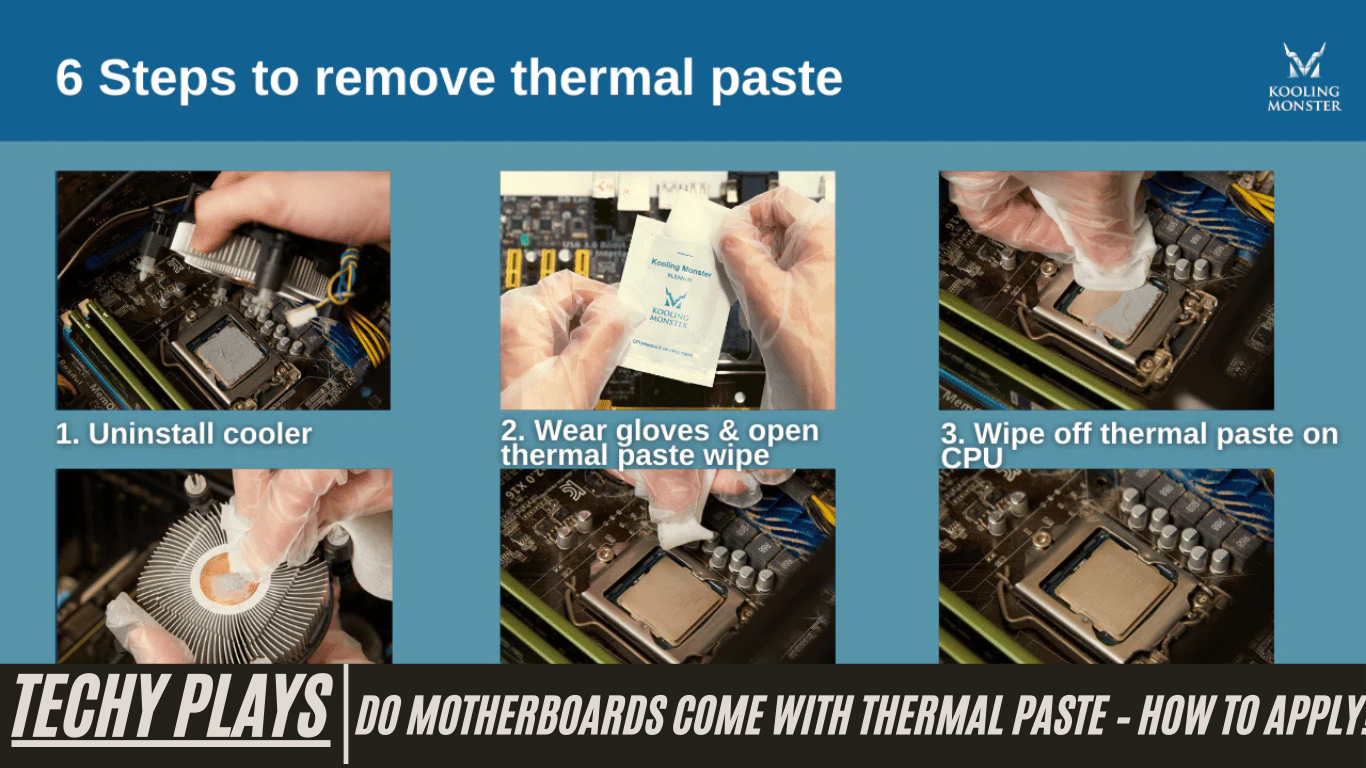
Applying thermal paste correctly is crucial to ensure optimal CPU cooling and system performance. The first step is to thoroughly clean both the CPU surface and the base of the heat sink. Dust, old paste, or residue can interfere with heat transfer, so using isopropyl alcohol and a lint-free cloth is recommended for a clean surface.
Next, apply a small, pea-sized amount of thermal paste directly onto the center of the CPU. It’s important not to use too much, as excessive paste can reduce cooling efficiency or even spill over the edges, potentially causing damage. After applying the paste, carefully place the heat sink onto the CPU. The paste will spread evenly as the heat sink is seated. Finally, gently secure the heat sink in place, tightening screws in a diagonal pattern to ensure uniform pressure. Proper application of thermal paste ensures efficient heat transfer from the CPU to the cooler, maintaining system stability and preventing overheating.
Do AMD CPUs Come With Thermal Paste?
Many AMD CPUs come with thermal paste already pre-applied on their stock coolers. This makes installation much simpler for users, as they do not need to worry about applying paste manually. Pre-applied thermal paste is especially convenient for first-time PC builders, ensuring consistent coverage and proper thermal conductivity from the moment the CPU is installed.
What About Ryzen 5 CPUs?
For AMD Ryzen 5 CPUs, whether thermal paste is pre-applied depends on the specific model and its packaging. Many Ryzen 5 CPUs include a stock cooler with pre-applied thermal paste, allowing users to install the CPU quickly and easily. However, certain higher-end models or boxed CPUs may come without pre-applied paste, giving users the option to use premium thermal compounds for enhanced cooling performance. Knowing your specific Ryzen 5 model is important to determine whether you need to apply thermal paste manually.
Do Ryzen 7 CPUs Come With Thermal Paste?
Most AMD Ryzen 7 CPUs include a stock cooler with thermal paste pre-applied, simplifying the installation process. This pre-applied paste ensures optimal contact between the CPU and cooler, allowing heat to dissipate efficiently and keeping the processor at safe operating temperatures. For users who wish to improve cooling performance further, replacing the stock thermal paste with a high-quality aftermarket paste can be considered, especially for overclocked systems.
And What About Intel CPUs?
The presence of pre-applied thermal paste on Intel CPUs varies depending on the specific model and its packaging. Some Intel CPUs come with a stock cooler that already includes thermal paste, making installation straightforward. Others, particularly high-end or enthusiast-level CPUs, may require the user to apply thermal paste manually to achieve the best thermal performance. Intel users should always check the included cooler and packaging instructions to determine whether additional paste application is necessary.
Why It’s Important to Apply Thermal Paste?
Applying thermal paste correctly is vital for maintaining CPU performance and longevity. Thermal paste acts as a conductor, transferring heat away from the CPU to the cooler. Without it, microscopic gaps between the CPU and cooler can trap heat, causing the processor to overheat. Overheating can lead to thermal throttling, where the CPU reduces its speed to prevent damage, or in severe cases, permanent hardware failure.
How Much Should You Apply?
When applying thermal paste, moderation is key. Using too much thermal paste can be counterproductive, as excessive paste can act as a barrier rather than a conductor, reducing heat transfer and potentially causing the CPU to overheat. The recommended approach is to apply a small, pea-sized amount or a thin line across the center of the CPU. When the heat sink is installed, this amount spreads evenly across the surface, ensuring maximum contact and optimal cooling. Correct application helps maintain lower CPU temperatures, improves performance, and prevents unnecessary thermal throttling.
Is Pre-Applied Thermal Paste Any Good?
Pre-applied thermal paste is convenient, especially for beginners or those looking for a hassle-free CPU installation. It saves time, eliminates the guesswork of applying the correct amount, and ensures that the CPU cooler makes proper contact with the processor.
However, PC enthusiasts and advanced users often prefer to use high-quality aftermarket thermal paste. Premium thermal compounds can offer better thermal conductivity and cooling efficiency, which is particularly beneficial for overclocked CPUs or high-performance gaming rigs. Ultimately, pre-applied paste is sufficient for most users, but upgrading to a quality thermal paste can enhance system performance.
How Do I Check if My CPU Comes with Thermal Paste?
To determine whether your CPU comes with thermal paste, check the product description or packaging. Most CPUs sold with a stock cooler will have thermal paste pre-applied to the cooler’s surface, ready for immediate installation. If your CPU does not include a cooler, you will need to apply thermal paste manually or use a cooler that comes with pre-applied paste. This ensures proper heat transfer and prevents overheating issues.
Do Factory Motherboards Come With Thermal Paste?
Factory motherboards typically do not include thermal paste pre-applied. Thermal paste is not part of the motherboard itself; it is applied on the CPU or CPU cooler to facilitate heat transfer. However, certain CPU coolers, especially those bundled with a processor, may come with thermal paste already applied to simplify the installation process. This allows users to install the CPU and cooler quickly without worrying about applying paste manually.
Will Your Motherboard Purchase Come With Thermal Paste?
When purchasing a motherboard, it is important to note that most motherboards do not include thermal paste. Thermal paste is associated with the CPU cooler, not the motherboard itself. Some CPU coolers bundled with a CPU or sold separately may have thermal paste pre-applied for convenience. Always check the specifications of your cooler or motherboard bundle to confirm whether thermal paste is included, ensuring a smooth installation process.
Where Do You Check Your CPU For Thermal Paste?
To check if thermal paste is already applied, inspect the surface of the CPU or the base of the stock cooler. Many stock coolers come with thermal paste pre-applied, which appears as a thin layer or dot on the cooler’s contact surface. If you are using an aftermarket cooler, you may need to apply your own paste. Ensuring proper thermal paste application is essential for maintaining optimal CPU temperatures and overall system stability.
How Do You Apply Thermal Paste?
Applying thermal paste correctly is essential for efficient CPU cooling. First, clean both the CPU and heat sink surfaces thoroughly using isopropyl alcohol and a lint-free cloth to remove dust or residue. Then, place a small amount of thermal paste—usually a pea-sized dot or thin line—on the center of the CPU. Carefully position the heat sink on top of the CPU, allowing the paste to spread evenly. Finally, secure the heat sink in place, tightening screws gently in a diagonal pattern to ensure even pressure. Proper application of thermal paste ensures maximum heat transfer, prevents overheating, and keeps the CPU running at peak performance.
Do CPUs Need Thermal Paste at All?
Yes, CPUs absolutely need thermal paste to operate safely and efficiently. Thermal paste acts as a critical mediator between the CPU and the heat sink, filling microscopic gaps that naturally exist on their surfaces. These tiny imperfections can trap heat if left unaddressed. By using thermal paste, heat is conducted away from the CPU more effectively, preventing overheating and ensuring that the processor maintains optimal operating temperatures. Without thermal paste, even a high-end CPU could throttle its performance or risk damage due to excessive heat.
Do Intel CPUs Come With Thermal Paste?
Most Intel CPUs come with a stock cooler that already has thermal paste pre-applied. This feature simplifies the installation process, especially for first-time PC builders, as it eliminates the need to manually apply paste. The pre-applied thermal compound ensures consistent heat transfer between the CPU and the cooler, allowing the system to maintain stable temperatures under load. However, advanced users or those building high-performance PCs may choose to replace the stock paste with a premium thermal compound for enhanced cooling efficiency.
Do You Need to Apply Thermal Paste to a New CPU When the Cooler Has Pre-Applied Thermal Paste?
If your CPU cooler already includes pre-applied thermal paste, additional application is usually unnecessary. The pre-applied thermal compound is designed to provide sufficient coverage and ensure efficient heat transfer. Applying extra paste on top of an already coated surface can actually reduce performance by creating uneven layers, which may hinder heat dissipation. For most standard PC builds, the pre-applied paste is fully adequate for optimal cooling.
Do I Need Thermal Paste To Install A New Motherboard?
No, thermal paste is not required when installing a new motherboard. Thermal paste is specifically used to enhance heat transfer between the CPU and the heat sink. Installing a motherboard involves mounting it in the case and connecting components, none of which require thermal paste. Only when attaching a CPU and cooler is thermal paste necessary to maintain safe operating temperatures.
Does Every CPU Come With Thermal Paste?
Not every CPU comes with thermal paste included. Some CPUs, particularly those bundled with stock coolers, have pre-applied thermal paste, making installation straightforward. However, higher-end CPUs or those sold without a cooler require users to manually apply thermal paste for proper heat management. Understanding whether your CPU includes pre-applied paste is crucial to avoid overheating issues and ensure optimal performance.
Do PC Cases Come With Thermal Paste?
PC cases do not come with thermal paste. Thermal paste is only used between the CPU and the heat sink to facilitate effective heat transfer. Since cases serve solely as enclosures for components and do not make direct contact with the CPU, including thermal paste with a case is unnecessary. Users must rely on the CPU cooler for thermal paste application.
Do PC Builds Come With Thermal Paste?
Most pre-built PC systems do not include separate thermal paste. However, some CPU coolers that come with the build may already have thermal paste pre-applied, simplifying installation for users. It is always a good practice to check the specifications of the CPU cooler or pre-built system to confirm whether thermal paste is included, ensuring that the CPU is properly cooled from the start.
Do CPUs Come With Thermal Paste?
CPUs themselves typically do not include thermal paste in their packaging. Thermal paste is usually applied to the base of a CPU cooler rather than the processor itself. However, some CPU coolers, especially those bundled with the processor, come with pre-applied thermal paste to simplify installation for users. This ensures proper contact between the CPU and the cooler from the start, providing efficient heat transfer and preventing overheating.
Does Thermal Paste Come With the CPU, If Not Where Do I Get It?
In most cases, thermal paste does not come packaged with the CPU itself. Users who need to apply thermal paste manually can purchase it separately from computer hardware stores or online retailers. Choosing a high-quality thermal paste is essential for optimal cooling performance, as it enhances heat transfer between the CPU and the cooler, ensuring stable CPU temperatures and preventing thermal throttling.
Do I Need to Buy Thermal Compound Separately or Does It Come With the CPU / Motherboard?
Whether thermal compound comes included depends on the specific CPU or cooler. Some CPUs or stock coolers include pre-applied thermal paste, allowing users to install the CPU without additional purchases. In contrast, higher-end processors or aftermarket coolers may not include paste, requiring users to buy a separate thermal compound to ensure effective heat dissipation. Motherboards themselves typically do not come with pre-applied thermal paste.
Is the Thermal Compound on the Bottom of the CPU Fan?
Yes, in many cases, the thermal compound is pre-applied to the base of the CPU fan or cooler. This layer of paste ensures immediate heat transfer upon installation and simplifies the assembly process, particularly for first-time PC builders. Pre-applied paste is designed to provide adequate coverage without the need for manual application, though some enthusiasts prefer to replace it with a premium thermal paste for better cooling efficiency.
Using CPU/Heatsink Without Thermal Material?
Using a CPU or heatsink without thermal material such as thermal paste is not recommended. Thermal paste is critical for bridging microscopic gaps between the CPU and cooler, allowing heat to transfer efficiently. Without thermal material, the CPU can overheat, potentially causing reduced performance, system instability, or permanent damage to the processor. Proper application of thermal paste is therefore essential for maintaining CPU health and performance.
Do I Need Thermal Paste for My New Mobo and CPU?
Whether you need thermal paste for a new motherboard and CPU depends on the cooling solution you choose. Many stock coolers included with CPUs come with pre-applied thermal paste, providing convenient and sufficient heat transfer. If using an aftermarket cooler or a CPU that doesn’t include paste, you will need to apply thermal compound manually to ensure proper cooling.
Does the AMD Ryzen 2600X Come With Thermal Paste Applied?
Yes, the AMD Ryzen 2600X typically comes with a stock cooler that has pre-applied thermal paste. This makes installation straightforward and ensures that the CPU is properly cooled from the start. Pre-applied paste helps users avoid errors in application and provides reliable heat transfer for stable system performance.
Does Old Thermal Paste Affect a PC’s Performance?
Yes, old thermal paste can negatively impact a PC’s performance. Over time, thermal paste can dry out or lose its effectiveness, reducing its ability to conduct heat away from the CPU. This can lead to higher operating temperatures, increased fan speeds, thermal throttling, and in extreme cases, potential hardware damage. Regularly checking and replacing old thermal paste is recommended to maintain optimal CPU cooling.
Does an Intel Stock Cooler Have Thermal Paste?
Yes, most Intel stock coolers come with thermal paste pre-applied on the base. This feature simplifies the installation process, especially for beginners, and ensures that the CPU maintains proper thermal contact with the cooler. Pre-applied paste is designed to provide efficient heat transfer, keeping the processor at safe operating temperatures.
Closing Thoughts
Motherboards generally do not come with pre-applied thermal paste, as thermal paste is specifically used to facilitate heat transfer between the CPU and its cooler rather than being part of the motherboard itself. However, some CPU coolers, particularly those included with certain processors, may have thermal paste pre-applied for convenience. This pre-applied paste ensures proper contact between the CPU and cooler, making installation easier and helping maintain optimal CPU temperatures from the start. Whether using a stock cooler or an aftermarket solution, ensuring that thermal paste is applied correctly is key to keeping your system stable and performing efficiently.
Frequently Asked Questions(FAQs)
1. When buying a CPU, does it come with a motherboard and thermal paste?
When purchasing a CPU, it typically does not come with a motherboard or separate thermal paste. CPUs are sold independently, and any necessary cooling solutions, such as stock coolers with pre-applied thermal paste, are usually included only in boxed versions. For custom builds, users must ensure they have both a compatible motherboard and appropriate thermal paste for proper CPU installation.
2. Do Intel processors come with thermal paste?
Most Intel processors come with a stock cooler that already has thermal paste pre-applied on its base. This feature simplifies installation, especially for beginner PC builders, and ensures efficient heat transfer from the CPU to the cooler. Users looking for enhanced cooling performance, such as for overclocked systems, may opt to replace the stock paste with a high-quality aftermarket thermal compound.
3. Do you really need thermal compound when mounting a processor to a motherboard?
Yes, thermal compound is essential when mounting a processor to a motherboard. Thermal paste fills microscopic gaps between the CPU and the cooler, allowing heat to transfer efficiently. Without it, the CPU may overheat, resulting in performance throttling or potential hardware damage. Proper application ensures consistent cooling and stable system performance.
4. Can excessive thermal paste harm my CPU or motherboard?
Yes, using excessive thermal paste can negatively impact your CPU or motherboard. Too much paste can reduce heat transfer efficiency, trap heat, or even spill over onto other components, potentially causing short circuits or other damage. Applying a small, pea-sized amount is sufficient to ensure effective cooling without risking harm.
5. Do I need thermal paste when changing motherboards?
Yes, applying thermal paste is necessary when changing motherboards. Installing a CPU onto a new motherboard requires a cooler with properly applied thermal paste to ensure optimal heat dissipation. Even if the CPU has previously been installed, old paste should be cleaned off and replaced to maintain proper thermal contact and system stability.
6. Does the i3 12100F come with thermal paste?
The Intel i3 12100F may come with thermal paste pre-applied on its stock cooler, depending on the specific packaging and cooler included. It is always recommended to check the CPU specifications before installation to confirm whether thermal paste is already applied, ensuring that the CPU is properly cooled from the start.
